
We bought OpenArt, ran it hard for 6 months, and burned real credits making AI ad creatives for live campaigns. So this is the operator version, not a spec sheet.
OpenArt pricing starts at $14/mo for the Starter plan, and every paid tier runs on one shared credit pool for images, video, characters, and audio.
Here's the money part up front. Our coupon ALL15 knocks 15% off monthly plans. It does not stack with annual billing, so you pick one discount route, not both.
Now let's break down every plan, the credit math, the coupon savings, and how it stacks against the other big AI image generator names. No fluff.
Key Takeaways on OpenArt Pricing Before You Spend a Dollar
How Much Does OpenArt Cost? A Complete Breakdown
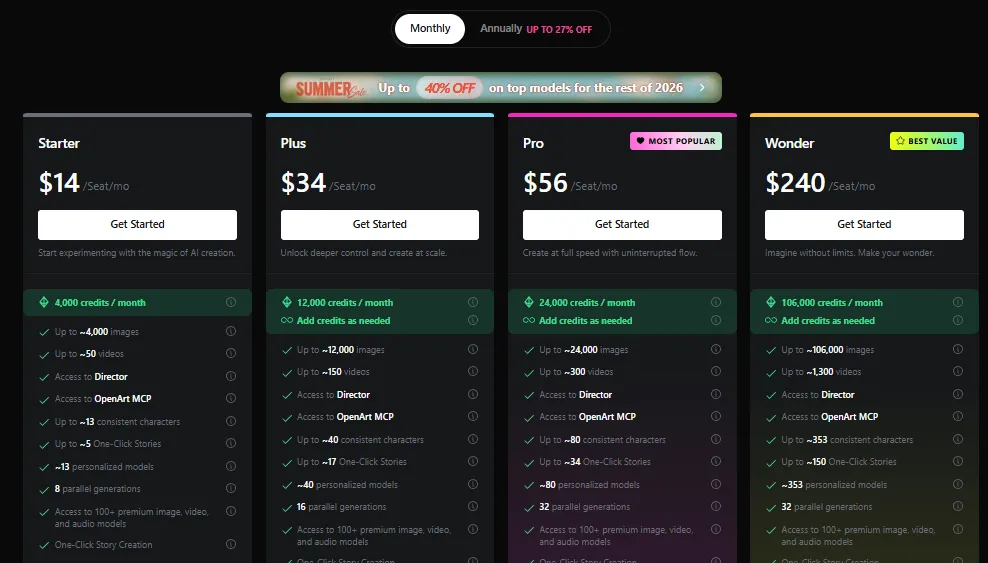
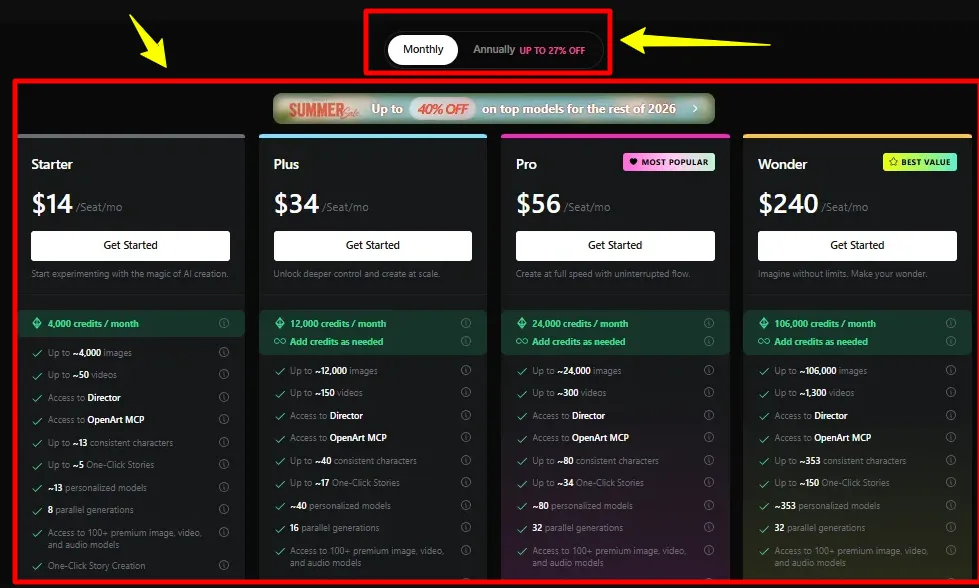
Here's the full lineup laid out clean so you can size it up fast. These are live monthly rates.
| OpenArt Plan | Monthly Price | Monthly Credits | Commercial Rights | Annual Discount |
|---|---|---|---|---|
| Starter | $14/mo | 4,000 | No | 10% off |
| Plus | $34/mo | 12,000 | Yes | 20% off |
| Pro (Most Popular) | $56/mo | 24,000 | Yes | 22% off |
| Wonder (Best Value) | $240/mo | 106,000 | Yes | 27% off |
Now let's get into what each tier really means when you're the one paying and running traffic.
One thing that stays constant across every tier: you get Director, the OpenArt MCP server, 100+ premium models, One-Click Story, the image editing suite, and watermark-free output.
So the plans don't gatekeep features much. What really separates them is credit volume, commercial rights, and how many jobs you can run at once.
|
OpenArt Pricing Deal Pick the plan that fits your credit volume, then use code ALL15 to save 15%. ALL15 View Plans & Save 15% → |
Starter Plan Breakdown for Solo Creators
Starter is the $14/mo entry door. It's built for one person testing the waters, not an agency shipping client work.
You get 4,000 credits a month, and since one pool feeds everything, that's roughly 4,000 images or about 50 short videos.
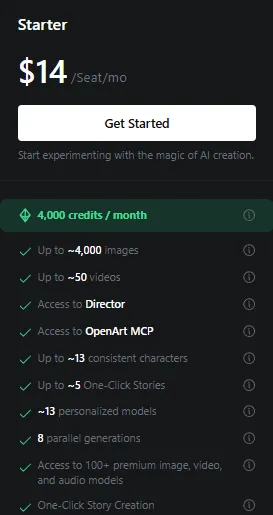
Here's what lands in the Starter box:
But here's the catch, dude. Starter has no commercial use rights. So if you're selling those creatives or slapping them on a client funnel, this tier won't cover you legally.
My take: Starter is a sandbox. Great for learning the tool, wrong for making money off it.
When I first spun up Starter, I burned through the 4,000 credits inside two weeks just testing video hooks. So budget accordingly if clips are your main play.
Also worth flagging, Starter caps you at 8 parallel generations. That's fine solo, but you'll feel the wait once you want ten variations of one creative at once.
Plus Plan Pricing and Commercial Use Rights
Plus is where OpenArt starts earning its keep for affiliates. It runs $34/mo and flips on the stuff that matters for paid work.
You jump to 12,000 monthly credits, which is roughly 12,000 images or about 150 short videos. Big step up from Starter.
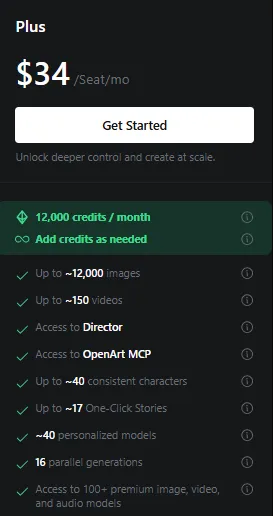
What Plus adds on top:
That commercial rights switch is the real line in the sand. The moment you plan to sell or run ads with the output, Plus is your actual floor.
So for a solo affiliate or a one-person shop running a handful of offers, Plus hits the sweet spot on price and rights.
Pro Plan Cost for High Volume Ad Creatives
Pro sits at $56/mo and wears the “Most Popular” badge for a reason. This is the tier most working affiliates settle on.
You get 24,000 monthly credits, roughly 24,000 images or about 300 short videos. That's genuine ad creative production volume.
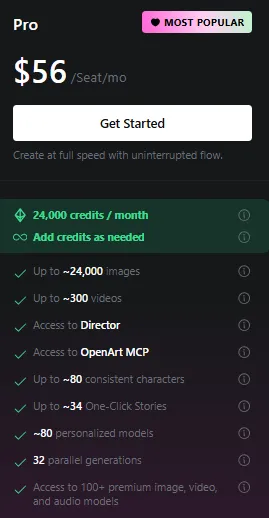
Here's what Pro stacks on:
Honestly, when I was testing dozens of hooks a week, Pro was the tier that stopped me from constantly topping up credits.
So if you're running multiple offers and need a steady flow of AI video generation and image variants, Pro is the practical pick.
The priority support line matters more than it sounds, too. When a launch is live and a render queue jams, waiting in a general support line costs you money.
During my run, Pro was the point where OpenArt stopped feeling like a metered gadget and started feeling like a proper AI content creation engine I could lean on daily.
Wonder Plan and Unlimited Creation Value
Wonder is the $240/mo monster tagged “Best Value.” It's aimed at studios, agencies, and volume machines.
You get a massive 106,000 monthly credits, which is roughly 106,000 images or about 1,300 short videos. That's a firehose.
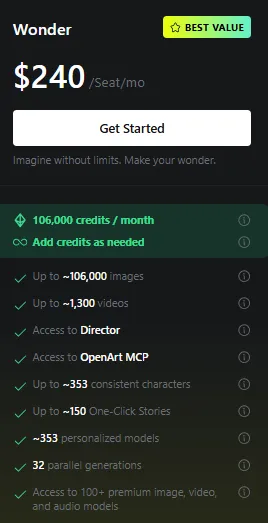
What makes Wonder different:
That unlimited creation perk is the headline. It's why high-output teams justify the jump instead of buying add-on packs forever.
But let's be real, dude. Unless you're staffing a content team or running a serious volume of client campaigns, Wonder is more tank than most solo affiliates need.
ALL15 Coupon Code Savings on Monthly Plans
Now the part your wallet cares about. Drop ALL15 at checkout and you knock 15% off any monthly plan.
Here's the coupon math spelled out so there's no guessing:
| Plan | Regular Monthly | With ALL15 (15% off) | Monthly Savings |
|---|---|---|---|
| Starter | $14 | $11.90 | $2.10 |
| Plus | $34 | $28.90 | $5.10 |
| Pro | $56 | $47.60 | $8.40 |
| Wonder | $240 | $204 | $36 |
One important note, dude. ALL15 does not stack with annual billing. Annual already carries its own discount, so you pick one lane or the other.
My rule of thumb: if you're testing the tool for a month or two, run monthly with ALL15. If you're locked in for the year, annual usually wins on total spend.
|
|
Monthly Plan Coupon Save 15% on any OpenArt monthly plan Monthly billing only · Cannot be combined with annual discounts |
ALL15
Claim 15% Off →
|
Extra Credit Add-On and Credit Rollover Rules
Ran your monthly credit allowance dry before the reset? There's an add-on for that.
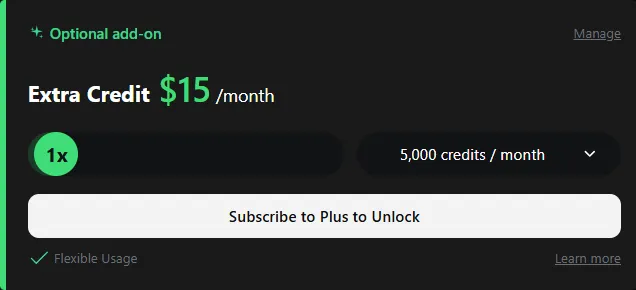
The Extra Credit pack costs $15/month and hands you 5,000 extra credits. It comes in 5,000-credit increments, so you can stack more than one.
Two rules matter here:
So if you're a credit hoarder who runs in bursts, the add-on is the only way to bank unused credits. Plan credits reset flat every cycle.
Monthly vs Annual OpenArt Billing Cost Difference
OpenArt gives you two billing lanes, and the gap between them is real money over a year.
Annual billing trims the per-seat rate by 10% on Starter, 20% on Plus, 22% on Pro, and 27% on Wonder. The bigger the plan, the deeper the yearly cut.
Here's how the annual per-seat rate lands:
So the decision is simple. Committing for a full year? Annual saves the most. Still kicking the tires? Monthly plus ALL15 keeps you flexible.
How Far Your Monthly Credit Allowance Goes
Credits confuse people, so let's ground it. Every generation, image or video, pulls from one shared credit pool on your plan.
That means you're not locked into “image credits” and “video credits.” You spend freely, and video simply eats more per clip than a still image.
Rough real-world math from my six months running it:
So think in terms of output pace, not just the credit number. A heavy AI video generation workflow drains credits way quicker than static images do.
Here's a trick I picked up. Lock your concept with cheap image generations first, then only spend the pricey video credits once the creative direction is nailed down.
That one habit stretched my monthly credit allowance way further than blindly generating video after video hoping something stuck.
OpenArt Team and Enterprise Pricing Options
Got a crew instead of a solo setup? OpenArt runs separate Team and Enterprise plans built around shared credits and collaborative workspaces.
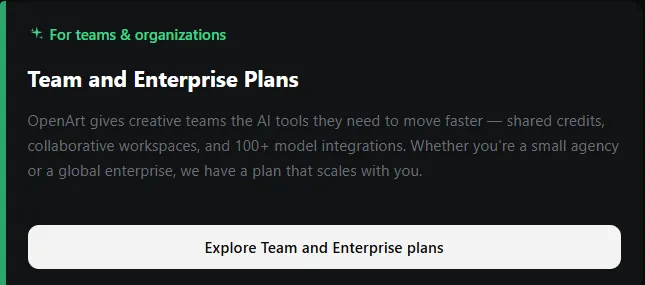
These aren't fixed public numbers. Team pricing scales with seats and usage, and Enterprise is a custom quote you sort out with their sales side.
What you're really paying for at that level:
So if you're a small agency pushing client creatives, the Team route is worth a quote instead of stacking individual Pro seats.
OpenArt vs Top AI Image Generator Rivals
Alright, price alone means nothing without context. Here's how OpenArt lines up against the three names affiliates ask me about most.
I've paid for these myself over the years, so this is from the trenches, not a feature chart.
| AI Creative Suite | Starts At | Free Option | Best At | Catch |
|---|---|---|---|---|
| OpenArt | $14/mo | Free tier | Images + video in one studio | Credits burn fast on video |
| Midjourney | $10/mo | No free trial | Raw image quality | Images only, GPU-time limits |
| Leonardo AI | $12/mo | Free tier | Image-first generation | Token system, thin on video |
| Runway | $15/mo | One-time credits | Video-first workflows | Credits drain quick |
Here's my honest read, dude. Midjourney still owns pure image quality, but it stops at stills, and there's no proper trial to test it cheap.
Leonardo AI is a solid image-first pick with a free tier, though its token setup gets fiddly and video is an afterthought.
Runway leans hard into video and does it well, but those credits vanish faster than you'd like once you start iterating.
OpenArt's angle is that it does both images and video in one AI creator studio, so you're not paying two subscriptions to cover a full campaign.
For an affiliate who needs stills, hooks, and short clips from one login, that all-in-one setup is the practical money-saver. Nobody wants five separate subscriptions bleeding the margin every month. One tool covering the job beats juggling four.
Plus, the consistent character feature lets you reuse the same face or brand mascot across a whole campaign. That reuse is gold when you're building recognizable ad creative production at scale.
Which OpenArt Plan Fits Your Campaign Budget
Let's cut through it and match a plan to where you actually are, like picking the right tool off the shelf.
So most solo affiliates should honestly start on Plus and climb to Pro once volume picks up. That's the natural path.
Best starting point for most solo affiliates · Use code ALL15
FAQ ABout OpenArt Pricing
Do OpenArt monthly credits roll over each month?
No, plan credits reset every month. Only the add-on credits from the Extra Credit pack carry into next month, so stack those if you hoard.
Does OpenArt Starter plan include commercial use rights?
No, commercial use rights kick in at the Plus plan. If you sell creatives to clients, skip Starter and grab Plus or anything above it instead.
Can I stack ALL15 coupon with annual billing?
No, the ALL15 code only cuts fifteen percent off monthly plans. Annual billing already carries its own discount built in, so the two never combine together.
How many videos does the Pro plan generate?
Pro hands you 24,000 credits each month, roughly 300 short clips or 24,000 images. Mix both freely since every generation pulls from one shared pool.
What does OpenArt MCP access let you do?
It pipes OpenArt straight into AI assistants and coding tools, so you fire off image and video jobs from your workflow without touching the dashboard.
Is Wonder plan unlimited creation actually unlimited?
Wonder layers unlimited creation on top of 106,000 credits, though nonstop heavy use still hits fair-use throttling at peak load, so expect a little slowdown sometimes.
The AFFDude Verdict on OpenArt Pricing
After six months of paying for it and pushing real creatives through it, here's where I land.
OpenArt is priced fair for what it does. Getting images and videos from a single studio genuinely cuts the tool stack an affiliate has to pay for.
The credit system is the one thing to watch, since video eats credits fast and Starter's pool empties quick.
AFFDude recommendation: start on Plus with code ALL15 if you're going monthly. Then move up to Pro once you're shipping creatives daily and want priority support in your corner.
It's not the cheapest single-purpose tool out there, but as an all-in-one it earns its spot in the rotation. Test it, run real work through it, and refund logic applies, so you'll know inside a month if it fits your stack.
Would I keep paying for it? Yeah. Six months in, it stayed in my tool rotation because it saved me from running two or three separate creative subscriptions.
That's the whole calculus for an affiliate. Fewer tools, cleaner margin, faster creatives. If OpenArt does that for your setup, the price justifies itself quick.
Recommended Articles
Affiliate Disclosure: This post may contain some affiliate links, which means we may receive a commission if you purchase something that we recommend at no additional cost for you (none whatsoever!)