Akool Pricing 2026: Plans, Credits and Real Costs Explained
 16 min read
Akool is a full AI video creation platform that we bought with our own card and ran hard for 9 months. Paid plans kick off at $15 per month, and there is a free Starter tier if you just want to poke around first.
The catch nobody warns you about is the credit based pricing. You are not buying minutes, you are buying credits that scale on a slider, so two people on the “same” plan can pay wildly different bills.
For affiliates cranking out video ad creatives, avatars, and translated angles, Akool earns its keep. But you have to know how the credits burn before you drop a rupee or a dollar on it.
So we broke down every tier, what it really opens up, and the plan we run ourselves.
Akool Pricing Key Takeaways
Akool Pricing Plans Explained in Detail
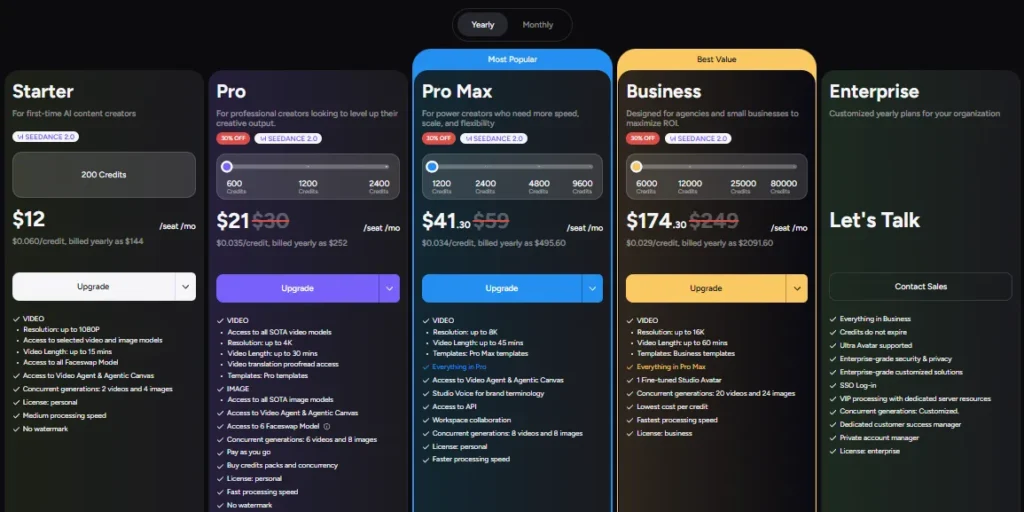
Here is the full ladder in one place. We put the numbers here once so the rest of the guide can stick to what each plan is actually good for.
| Akool Plan | Yearly (per seat / mo) | Monthly billing (approx) | Credits / mo | Max resolution | Best for |
|---|---|---|---|---|---|
| Free | $0 | $0 | Trial credits | 720p | Kicking the tires |
| Starter | $12 | ~$17 | 200 | 1080p | First paid step |
| Pro 🔥 | $21 | ~$30 | 600 | 4K | Solo affiliates |
| Pro Max | $41.30 | ~$59 | 1,200 | 8K | Volume + API |
| Business | $174.30 | ~$249 | 6,000 | 16K | Agencies |
| Enterprise | Custom | Custom | Negotiated | 16K+ | Big rollouts |
Prices pulled from Akool's live plan data. The page shows $0 placeholders to fresh loads, so confirm before you buy.
1. Akool Free Plan: The Watermarked Sandbox
The free tier exists so you can poke around before spending a cent. It is genuinely useful for one thing only, which is checking if the interface clicks for you.
What you get:
Honestly, you cannot ship anything client facing from here. The watermark alone kills it for video ad creatives. Treat it as a demo, then move up.
2. Starter Plan: Your First Paid Step
Starter drops the watermark and bumps you to 1080p. That is the headline reason people upgrade from free.
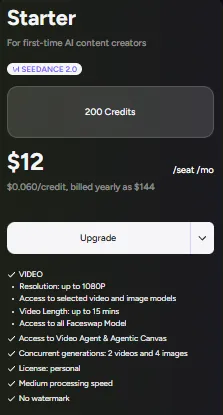
What lands on this tier:
Here is our honest read. Starter looks tempting at $12 per seat per month, but 200 credits vanish fast, and the model limits box you in quickly.
Most affiliates outgrow it inside a week. We did.
3. Pro Plan: Where The Real Work Starts
Pro is the tier we point almost everyone toward. This is the first level that flips on the full SOTA video model set, which changes the output quality entirely.
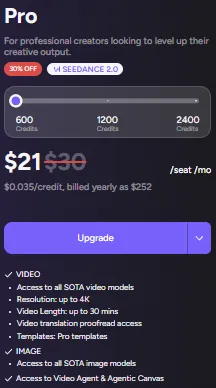
What Pro adds on top of Starter:
For a solo affiliate cranking out video ad creatives, Pro is the sweet spot. You get real model quality without paying agency money.
The catch is credits. At 600 a month you plan your output, because 4K and longer clips eat through them faster than you expect.
4. Pro Max Plan: Volume, API, And Longer Video
Pro Max is the jump for people running AI video generation at scale or wiring it into their own stack. This is where automation becomes possible.
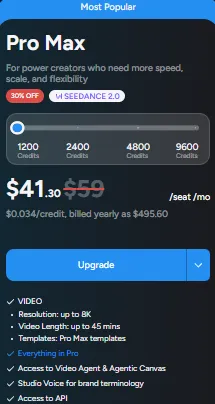
What you pick up here:
If you are building a workflow that pumps out creatives on autopilot, the API alone justifies the tier. That is the line most serious operators cross.
Meanwhile, the longer video ceiling makes it fine for training clips and webinar cuts too.
5. Business Plan: Agency Scale And Commercial Rights
Business is built for agencies and shops running heavy volume. It is also the first plan with a proper business use license, which matters more than people realize.
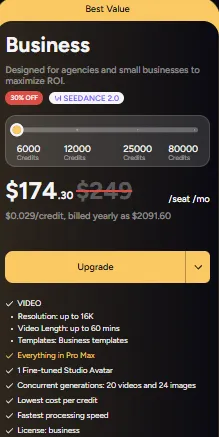
What separates Business:
At $174.30 per seat, this is not a solo affiliate plan. Still, if you are producing creatives for clients, the license and the credit ceiling earn their keep.
The per credit rate also drops here, so high volume teams pay less per video than lower tiers do.
6. Enterprise Plan: Custom Deals For Big Rollouts
Enterprise is a phone call, not a checkout button. Pricing is negotiated around your usage, and it is aimed at companies embedding Akool into their own products.
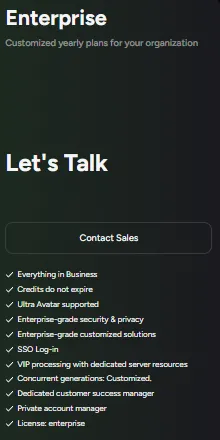
What custom money buys:
Frankly, most affiliates never touch this. It becomes relevant once you are spending real API money at volume and need credits that stop expiring.
How Fast Akool Credits Actually Burn?
This is the part the pricing table hides, and it is the thing that decides your true cost. Akool runs on credit based pricing, and the burn rate is not even across tools.
From our own nine months on the platform, a few patterns held:
Because credits reset monthly and do not roll over, your real job is matching the plan to your output. Overshoot and you buy top ups. Undershoot and you waste money.
Our rule of thumb: pick the tier one notch above what you think you need, then watch the meter for a month.
Add-On Credit Packs When You Run Dry
Good news if you blow through your monthly pool early. On Pro and Pro Max you can buy extra credit packs and concurrency on a pay as you go basis, so a busy launch week does not stall your output.
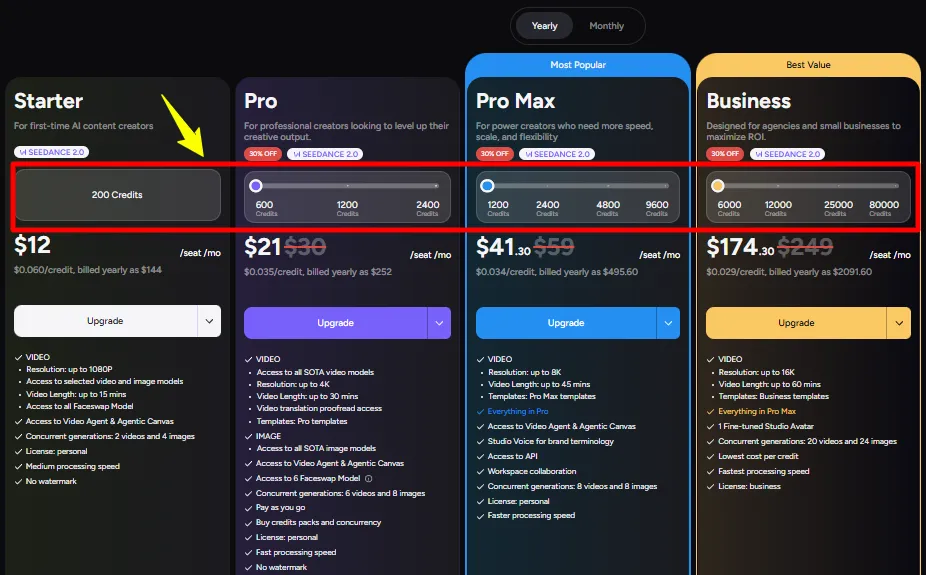
We lean on this during heavy testing sprints. When a campaign is scaling and we need twenty creative variations by Friday, topping up beats waiting for the reset.
Two things to keep in mind, though. Top up credits still sit inside the monthly cycle, and they are priced above your base rate. So plan the base tier around your steady volume, then treat packs as overflow, not a crutch.
The Per Seat Pricing Trap For Teams
Here is the gotcha nobody flags loudly enough. Akool bills on per seat pricing, and every admin or editor you invite pays the full plan rate.
So a five person Pro team is not one subscription. It is five, stacked. That turns a friendly $21 seat into a real monthly line item fast.
For solo operators this is a non issue. For agencies, it reshapes the math entirely, and it is why the Business tier's lower per credit cost matters at scale.
Personal License Versus Business License
This distinction trips up affiliates constantly, so let us be blunt. Starter, Pro, and Pro Max ship with a personal use license. Business is the first tier with commercial rights.
For your own money site campaigns, the personal license usually covers you fine, since you are the end user of the creative.
Once you are producing videos for clients or reselling the output, though, the business use license on the Business plan is the clean route. Do not skip that step on agency work.
Akool Pricing Versus Top Competitors
Akool does not live alone. Since you are weighing an AI avatar generator against ad focused rivals, here is how the entry pricing stacks up in our own words.
| AI Video Generator | Starts around | Strongest at | Weak spot |
|---|---|---|---|
| Akool | $12/seat/mo | Broad toolkit: avatars, face swap, translation, ads | Credit burn and per seat billing |
| HeyGen | ~$29/mo | Polished talking head avatars | Thin on face swap and effects |
| Synthesia | ~$18/mo | Corporate training avatars | Not built for scrappy ad creatives |
| Creatify | ~$39/mo | UGC style video ads from a product link | Narrow toolset, ads only |
Our take after running most of these: Akool wins on breadth. No other tool at this price bundles avatar video creation, face swap, and video translation together.
If you only need clean talking head avatars, HeyGen is smoother. If you only pump UGC ad clips, Creatify is faster. Akool is the one platform that does the lot.
Cost Details To Check Before Checkout
A couple of billing facts are worth knowing before your card gets charged, because they change the real cost of ownership.
None of this is a dealbreaker. It just means you should walk in with your monthly output roughly mapped, then pick the tier that fits it without forcing constant top ups.
Which Akool Plan Should An Affiliate Pick
Let us match the plan to how you actually work, because the right tier depends entirely on your output.
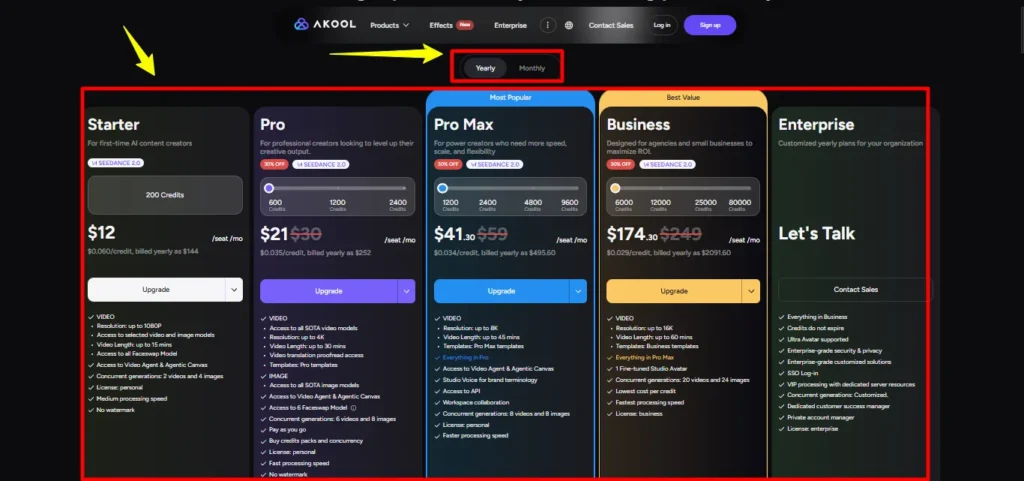
Nine times out of ten, an affiliate reading this wants Pro. It is the honest starting line.
FAQs About Akool Pricing
Does Akool charge per seat for every teammate?
Yes, every admin or editor you invite pays the full plan rate. A five seat Pro team costs five times one subscription, with no bulk discount.
Do unused Akool credits roll over monthly?
No, credits reset every billing cycle and expire unused on standard plans. Only Enterprise removes that expiry, so size your plan around real monthly output.
Which Akool plan opens the full model library?
Pro is the first tier granting the full SOTA video model set plus 4K output. Starter runs only selected models, so most affiliates skip past it.
Is API access included on lower Akool tiers?
No, API access begins on Pro Max and above. Starter and Pro seats cannot hit endpoints, so automation builders need at least the Pro Max plan.
Does the personal license cover paid ad campaigns?
For your own campaigns it usually covers you, though agency or client resale work points toward the business use license sitting on the Business tier.
How much does yearly billing actually save?
Annual billing knocks roughly thirty percent off every paid Akool plan versus monthly. Over a year that saving funds several extra months of real output.
Final Take Before You Buy Akool
Akool is not the cheapest tool on your shelf, and it was never trying to be. What it sells is range, one login that handles avatar video creation, face swap, and video translation without stitching three subscriptions together.
For an affiliate, that consolidation is the whole pitch. Fewer tools, fewer logins, more creatives out the door.
Start on Pro, watch your credit meter for the first month, and only lock the annual rate once the tool proves it belongs in your stack.
So here is the real question: how many ad creatives are you shipping a month, and which tier keeps up without draining you dry?
Recommended Articles